Commander GPT-AI Command Line Interface-OpenAI-GPT Model-Commander GPT - AI Language Translation, Content Detection, Writing Tool, Writing Prompts

Commander GPT
4.5 Points
Commander GPT - AI Language Translation, Content Detection, Writing Tool, Writing Prompts

Freelance Writing
Content Management
Media Editing
Others
AI Command Line Interface
OpenAI
GPT Model
 PC
PC Overseas Service
 Favorites
Open Website
Product Details
 Product Introduction
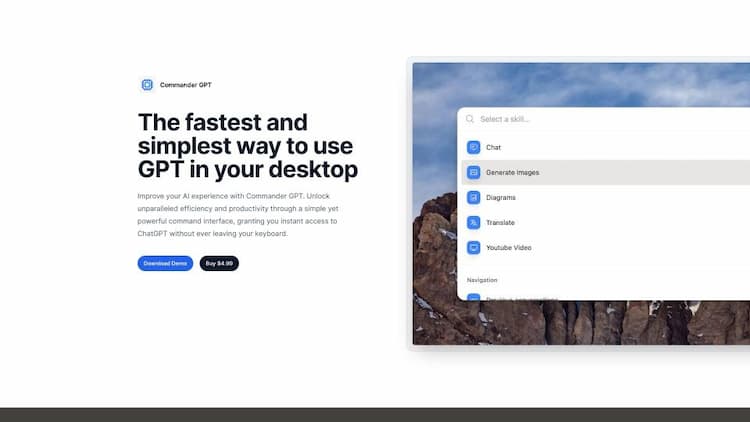
CommanderGPT is an AI tool designed to enhance the user experience with AI tools. It is a command-line interface that allows you to access various OpenAI GPT models and easily perform a variety of tasks with them. This tool is compatible with both Mac and Windows and can be accessed with a single command by pressing Command+Shift+G. With CommanderGPT, you can generate images, translate text, access ChatGPT with simple commands, or ask questions related to videos on YouTube. The tool can be accessed over any application you use on your Mac or Windows without interrupting your regular workflow.
 Main Function
CommanderGPT is an AI tool that provides access to various OpenAI GPT models through a command-line interface, allowing for easy execution of various tasks. With CommanderGPT, you can generate images, translate text, interact with ChatGPT using simple commands, or ask questions related to YouTube videos. This tool can be accessed on top of any application you use on your Mac or Windows without interrupting your regular workflow. Additionally, CommanderGPT features a local history function that tracks your interactions with the tool and allows for customization of the assistant by passing custom system prompts to GPT and modifying its response behavior.
How to Use
To access CommanderGPT, simply press Command+Shift+G. With this tool, you can utilize various OpenAI GPT models and perform tasks such as generating images, translating text, and accessing ChatGPT through a command-line interface. It seamlessly integrates with your regular workflow on both Mac and Windows, allowing you to use it alongside any application without interruption. Additionally, you have the flexibility to customize the assistant by providing custom system prompts and modifying its response behavior.
Commander GPT Traffic

2.60KMonthly Visits

461Similar Ranking
User Rating
What's Your Impression of Commander GPT
AI Recommendation


Commander GPT Comparison

All resources on this platform are collected from the internet. The platform itself is not involved in content creation.For inquiries such as copyright infringement, report of illegal content, submissions, or business collaborations, please contact the administrator for prompt resolution.Contact Email: ai-apps@ieferry.com
Copyright ©2023 AI-Apps. All rights reserved.